AI prompt tracking
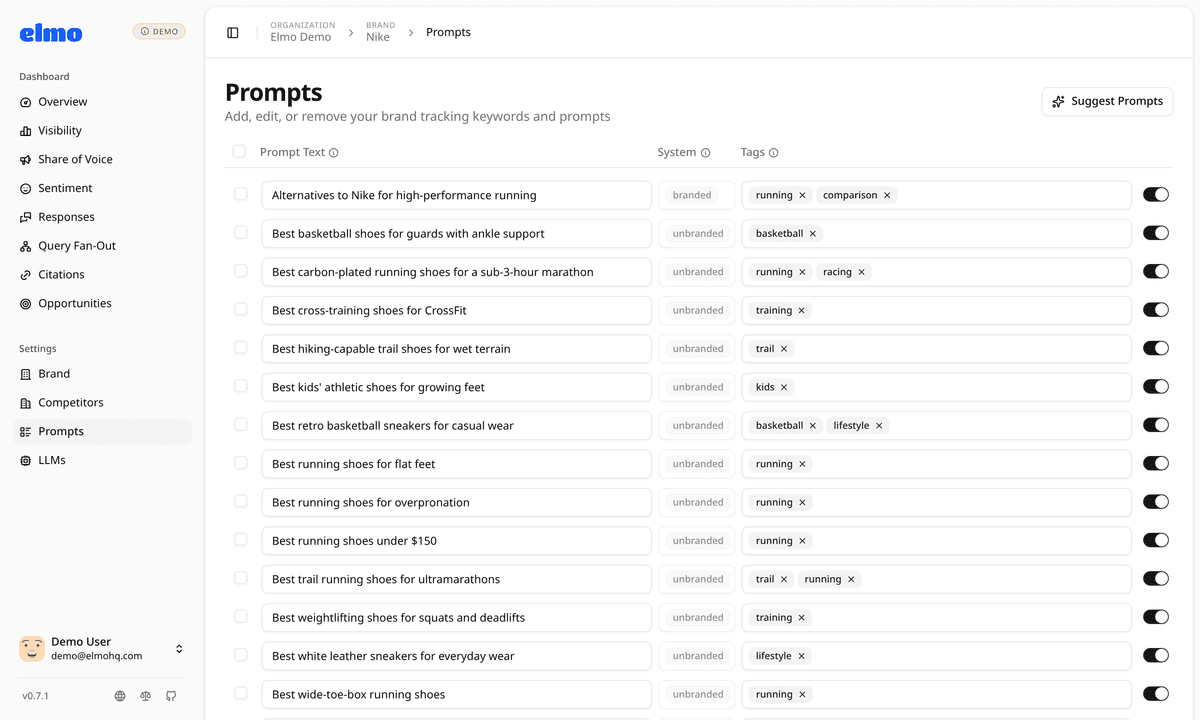
Prompts are the questions Elmo asks AI engines on your behalf. Elmo suggests them from your website, tags each one as branded or unbranded, lets you organize them with your own tags, and keeps every answer so you can search it, filter it, and see exactly what each engine said.
What you can do
1Start from your website
Paste your site and Elmo suggests products, competitors, aliases, and tagged starter prompts. Ask for more suggestions any time; it skips what you already track.
2Organize with tags
Tag prompts by topic, product, or persona, then filter every page in Elmo by tag. Prompts that name your brand are marked branded automatically.
3Inspect every answer
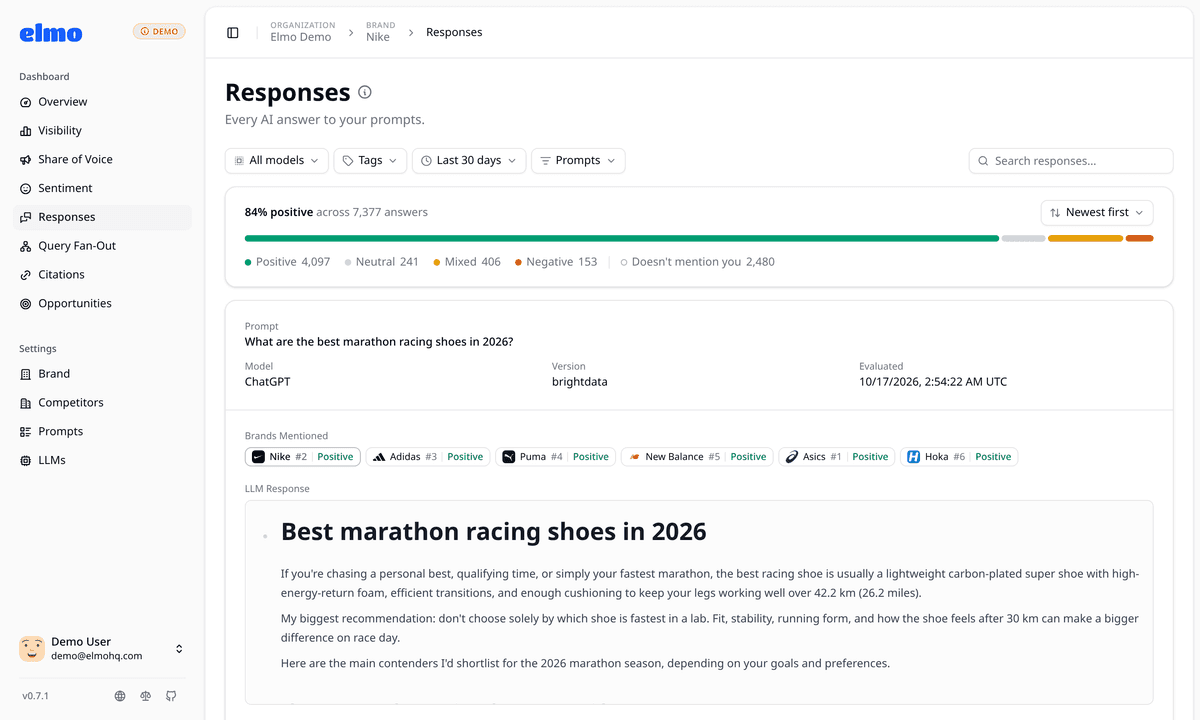
Open any prompt to see each engine's response, the brands it named and where, the searches it ran, and the sources it cited.
Data you can act on
- Per-prompt visibility
- How often answers to each prompt mention your brand, and the trend.
- Branded and unbranded
- Whether a prompt names your brand, set automatically and overridable with a tag.
- Brands mentioned
- Each company an answer names, with its position and the answer's sentiment toward it.
- Responses
- Every AI answer to your prompts, searchable by its text and filterable by prompt, model, and sentiment.
- Prompt history
- Each prompt's mentions, web queries, citations, and responses over time, and when it runs next.
Use cases
- Separate branded prompts (people already asking about you) from unbranded category prompts where you have to earn the mention.
- Group prompts by product line or audience and compare visibility between them.
- Read exactly what ChatGPT said about you last Tuesday, and how that compares with today.
Why Elmo
Prompts you can see and edit
Every prompt is plain text you control: add them one at a time or paste several at once, and pause or remove any of them.
Nothing summarized away
Every response is stored and shown in full, so any score can be traced back to the answers behind it.
Same data over API and MCP
Create and update prompts, and read runs, from the API or an AI assistant connected over MCP.
Related features
All features- AI visibility trackingHow often AI answers mention your brand, per prompt and per model, with trends over time against every competitor.
- Query fan-outThe web searches AI engines run behind each answer, and the words they add to or drop from your prompts.
- Sentiment analysisEvery answer that names you, read for praise or criticism and scored 0 to 100, with the passages behind it.
Frequently asked questions
Something we didn't cover? Ask the maintainers directly on Discord.
What is AI prompt tracking?
AI prompt tracking means asking AI engines the same set of questions on a schedule and recording how they answer: whether they mention your brand, how they describe it, and which sources they cite.
Where do the prompts come from?
When you add a brand, Elmo analyzes your website and suggests starter prompts with tags. You can edit them, write your own, paste several at once, or ask for fresh suggestions later.
How many prompts can I track?
Elmo Cloud plans include 50 to 350 prompts, depending on the plan. Self-hosted, you pay your scraping and model providers for each run instead of a plan.
What's the difference between branded and unbranded prompts?
A branded prompt names your brand, like 'Is Acme good for small teams?'. An unbranded prompt is a category question, like 'best CRM for small teams', where AI chooses which brands to mention. Elmo tags each prompt automatically, and you can override it.
Start winning AI search today.
Start tracking your brand in minutes. Plans start at $29/mo.
- Self-serve
- Unlimited seats
- API and MCP access
Want a walkthrough first? Book a 30-minute tour.